Login
Login

Can I get a refund for my unused lab orders?
Last updated October 25, 2026
✅ Yes, you can request a refund - and it’s super easy.
No need to email or submit a ticket. You can do it all yourself in just a few clicks right from your patient portal.
How to Request a Refund
1. Log into your patient portal
2. Go to the Orders section
3. Find the order you'd like to refund
4. Click "Cancel & refund"
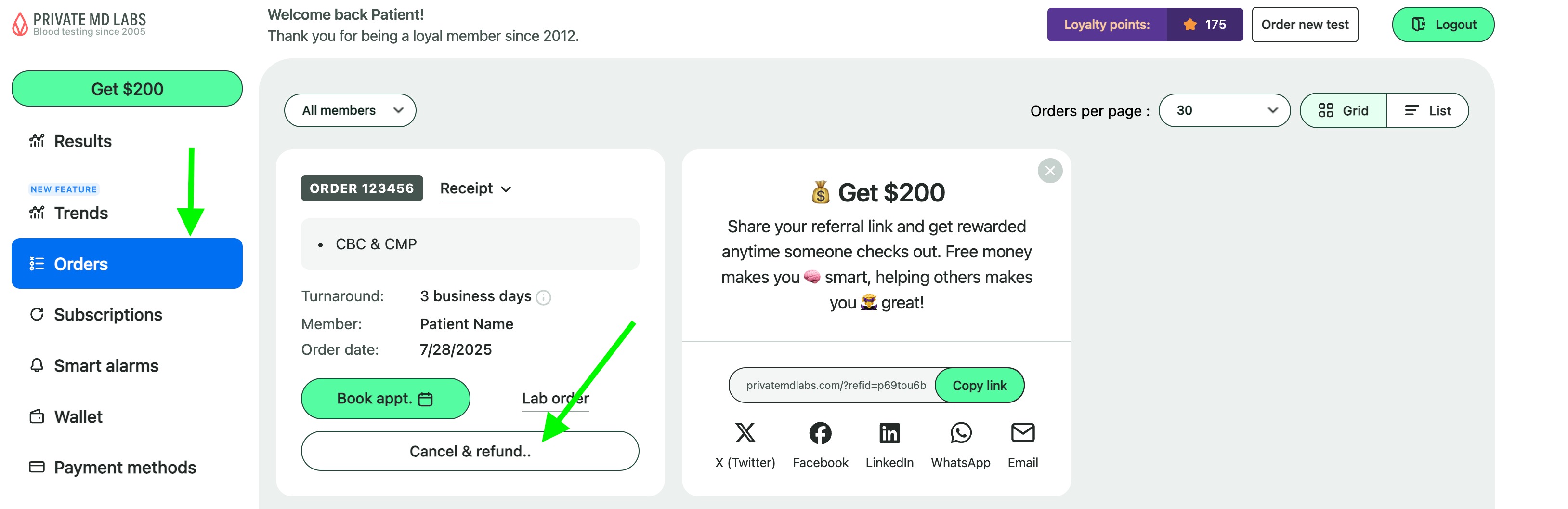
5. A pop-up will show your available refund optionsgive you two choices: keep your order as is, or take a 100% instant refund to your Wallet

What Kind of Refund Will I Get?
Any unused order, whatever its age:
- 100% credit to your wallet — the full amount you paid
Note: If this was your first subscription renewal, the refund amount will be adjusted to account for the subscription discount you received on your original order, as it was technically a one-time order and therefore not eligible for subscription refunds.
Would you rather have the money back on your card?
- Cash refunds are no longer offered in the portal. Text our support team and they will sort it out with you — the amount is quoted for your specific order.
This credit never expires and can be used for any future lab order. If the order is part of a subscription, the same pop-up lets you cancel the subscription at the same time.
What Happens After You Request It?
- Credit: Added instantly to your account wallet
- Cash refunds (arranged with support): Processed within 5–10 business days back to your original payment method
Once you've requested a refund, you’ll still have access to your order receipt and can reorder the same test anytime.
Need Help?
We’ve got you. If you have questions or run into any issues, text us: 754-799-7833
Our friendly support team is here for you.
Did this answer your question?
Still need an answer?
Feedback goes to the team that writes these answers. If you need your question sorted now, reach us directly — we usually reply within a few minutes.