Login
Login

How do I find my new order?
Last updated October 25, 2026
To find your new order, just log in to your account using the email address you used to place your order.
Here’s the login link: Log in to your account
Once you're logged in, make sure you’re on the "Orders" page, and that’s it! Your most recent orders will be right there.
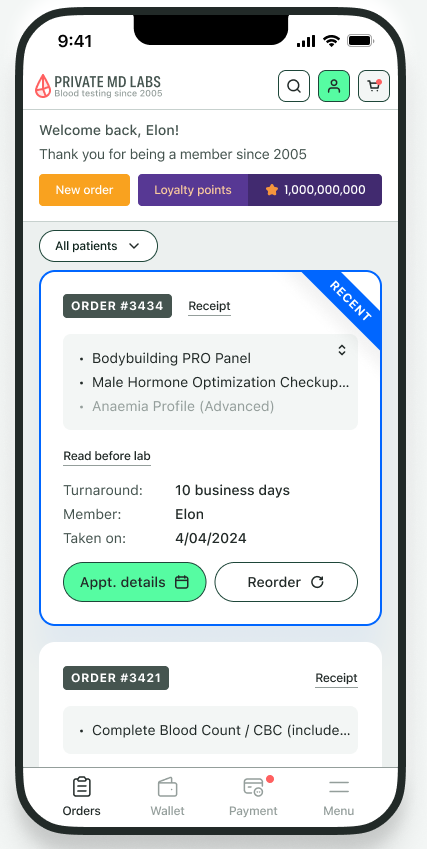
We can work our magic based on the email associated with the order, so make sure you log in using the same email address you used when you placed your order.
If you think you may have placed your order with a new email address and can’t find some of the orders, no worries! Our super-friendly customer support team is here to save the day.
Just contact us by submitting a ticket here or via text 754-799-7833 (text only), and we’ll help you find your orders and/or merge your profiles.
Did this answer your question?
Still need an answer?
Feedback goes to the team that writes these answers. If you need your question sorted now, reach us directly — we usually reply within a few minutes.